INSPECTIONS, RESULTS & REINSPECTIONS
The walls are ready to close. The rough-in inspection is not.
How construction inspection tracking software keeps required checks, results, corrections, dates, and closeout records connected to the job.Published November 6, 2026 · 13-minute read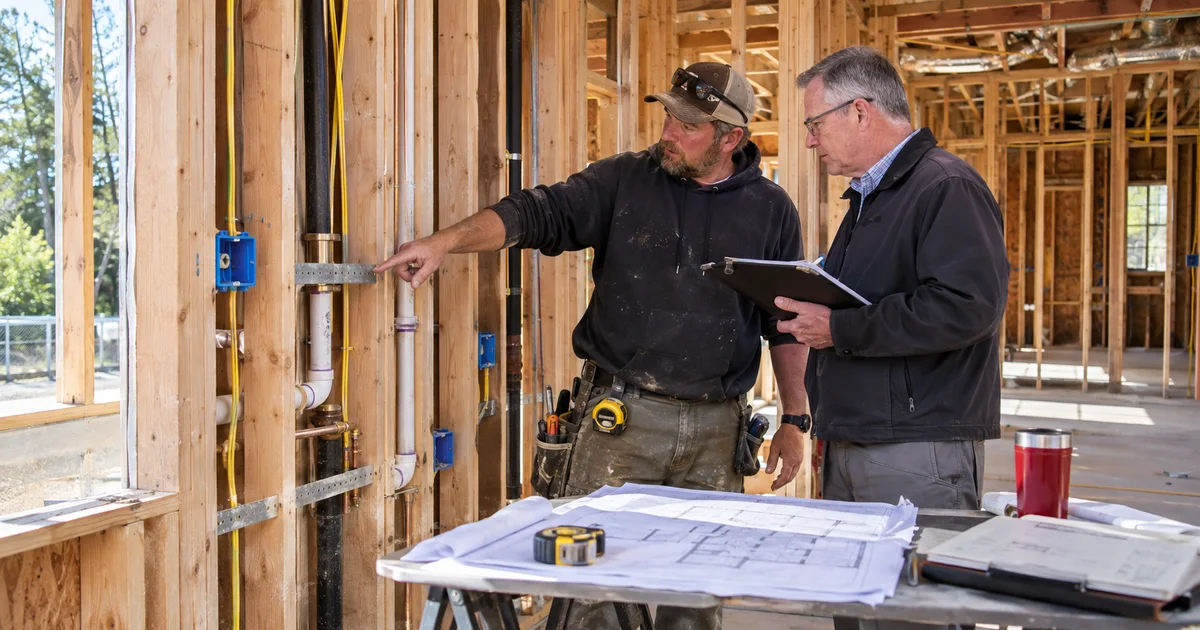
The insulation crew is waiting. Drywall is booked. The electrician says rough-in is complete, but nobody can confirm whether the electrical inspection was requested. The permit card is in the truck that is not onsite, a correction note may be in someone's email, and covering the walls before the required approval could mean opening them again.
That is the real problem behind searches for construction inspection software, permit inspection tracking software, and building inspection software for contractors. Builders do not just need another calendar event. They need to know which inspection belongs to which permit, what must be ready, who confirmed the appointment, what the official result was, what must be corrected, and whether the job can move to the next phase. BuildVecta connects those records to the project while keeping every compliance decision with the proper authority and contractor.
THE SHORT ANSWER
Construction inspection tracking software shows which required inspections are unscheduled, scheduled, passed, or waiting for correction and reinspection.
BuildVecta keeps inspections inside the applicable permit record. A builder can record the inspection name, confirmed date, status, inspector, and result notes; add the date to the job schedule and tasks; keep related plans, photos, reports, and correction records with the job; and prevent recorded open inspections from disappearing during permit closeout. BuildVecta organizes the process. The authority having jurisdiction performs the official inspection and determines the result.
An inspection date without readiness information is only a reminder
“Framing inspection Friday” does not tell the superintendent whether the trade inspections are complete, required documents are onsite, concealed work is still visible, corrections are resolved, or the building department actually confirmed the appointment. A useful inspection record answers both the calendar question and the field question: Are we ready for the inspector to see this work?
| Inspection record | Question it should answer | What goes wrong when it is missing |
|---|---|---|
| Permit and inspection name | Which official approval and phase does this check belong to? | The team requests the wrong inspection or assumes one approval covers another. |
| Confirmed date and status | Was the appointment actually accepted, and what is its current state? | Crews plan around a date that exists only on an internal calendar. |
| Readiness requirements | What work, access, documents, tests, or prerequisite approvals must be ready? | The inspector cannot complete the visit or the work is not ready to pass. |
| Inspector and result notes | Who performed the inspection, and what did the official record say? | A verbal summary replaces the actual finding and details are lost. |
| Correction and reinspection | What must change, who owns it, and when will it be checked again? | The failed item remains open while downstream work continues. |
| Supporting files | Where are the approved plans, inspection card, report, photos, and response? | Closeout becomes a search across phones, inboxes, portals, and trucks. |
How BuildVecta tracks an inspection from requirement to closeout
Connect it to the permit
Add the required inspection to the applicable permit record so the result does not become an unrelated calendar item.
Verify the agency process
Use the official portal, phone, email, or other required method to request the inspection and confirm the date.
Put it on the job plan
Record the confirmed date and add the inspection to the project schedule and task list with preparation notes.
Preserve the result
Record Passed or Failed / reinspection, the inspector, official notes, and related files instead of relying on memory.
Assign the response
Connect corrections to the responsible person, current plans, field questions, photos, cost, and revised schedule.
Close only when complete
Verify every required inspection is officially passed before treating the permit and project milestone as closed.
Keep permit approval and field inspections in the same workflow
A permit authorizes work under the issuing authority's conditions. It does not mean every future inspection is complete. BuildVecta's permit management workflow keeps the application, agency, permit number, issuance record, expiration, corrections, supporting documents, inspections, and closeout information together.
Each inspection can be named for the actual required check—such as footing, foundation, rough plumbing, rough electrical, framing, insulation, or final—based on the official permit and agency instructions for that job. BuildVecta does not create a universal inspection list because project scope and jurisdictional requirements differ. The builder verifies the required sequence with the authority having jurisdiction.
Use four clear statuses instead of vague notes
“Inspection handled” is not a usable status. It may mean requested, scheduled, completed, passed, or waiting for a return visit. BuildVecta uses four direct inspection states:
- Not scheduled: the inspection is required, but no confirmed appointment is recorded.
- Scheduled: the date has been confirmed through the agency's process and preparation is underway.
- Passed: the builder has recorded the official result and preserved the relevant evidence.
- Failed / reinspection: the official finding requires corrective work or another visit before the milestone can close.
The permit dashboard counts currently scheduled inspections so the builder can see upcoming activity across the job record. Status is only as accurate as the information entered. Confirm the agency's official record before marking an inspection Passed.
Work backward from the inspection date
Once the authority confirms the appointment, add the date to the construction schedule and create the preparation tasks that must finish beforehand. The inspection should function as a milestone with real predecessors, not as a last-minute reminder.
If a product selection, unanswered field question, missing trade, or delayed delivery threatens the date, update the schedule before crews are committed to the next phase. BuildVecta keeps the inspection task with the job so downstream dates can be reviewed in context.
Do not cover work that still needs to be seen
Concealed work creates one of the clearest inspection risks. A wall, trench, connection, flashing detail, reinforcement placement, or other installation may need to remain accessible until the required inspection or test is complete. The exact hold point belongs to the approved project documents and authority requirements—not to a generic software template.
Use the project schedule and task list to make the hold point visible. Keep progress and concealed-work evidence in the jobsite photo record. Photos can support the project history, but they do not replace an inspection when the authority requires an onsite visit or a report from an approved person.
Record the official result before the details scatter
After the visit, record the inspector's name, date, status, and result notes in the permit inspection entry. Upload or file the inspection card, portal result, written report, correction notice, or other official record in the construction document system. Add relevant field conditions and work completed to the daily log while the visit is still fresh.
Avoid rewriting an official finding into a shorter version that changes its meaning. Preserve the original record and use internal notes for the builder's next actions. If the result is unclear, confirm it with the inspector or agency before authorizing the next phase.
A failed inspection needs a controlled response—not a text-message scramble
A failed inspection is not just a red status. It is a new work sequence. The builder must understand the official finding, identify the affected scope, assign the correct person, confirm whether a revised detail or professional response is required, complete and document the correction, and request reinspection through the agency's process.
BuildVecta keeps the failed inspection open as Failed / reinspection. Use a linked task for the physical correction, an RFI when the project needs an authorized design clarification, and a change order when the approved response changes contractual scope, price, payment timing, or contract time. Then update the inspection date and downstream schedule instead of silently moving the original appointment.
Inspection corrections, punch items, and safety findings are not interchangeable
Builders often track several kinds of open work at once, but the records should remain clear:
| Record | Who controls the acceptance | Where it belongs |
|---|---|---|
| Required permit inspection | The authority having jurisdiction or its approved inspector. | Permit inspection record with official result and supporting files. |
| Special inspection or test | The required approved agency, professional, or testing party under the project documents. | Project file linked to the applicable work, schedule milestone, and acceptance record. |
| Internal quality check | The builder's quality-control process. | Task, daily record, photo, or internal checklist before formal inspection. |
| Punch-list item | The contract and project closeout process. | Punch list with responsible party, due date, and verification. |
| Safety observation | The employer and qualified safety roles required for the work. | Company safety process and required records; escalate immediate hazards directly. |
One issue may create more than one record. For example, an inspection correction may require a schedule task and a change order, but the official inspection result should remain intact rather than being replaced by those internal records.
Do not let a passed inspection become an unsupported checkmark
A status should lead to the evidence behind it. Keep the result with the permit number, inspection type, date, inspector or agency, notes, and available official documentation. If the project has lender draws, insurance requirements, owner reporting, warranties, or later service work, that inspection history may be needed long after the crew moves on.
BuildVecta keeps permits and inspections inside the job's digital record. Related plans, contracts, photos, daily logs, invoices, and closeout documents remain available in their appropriate sections. The contractor decides what must be retained and for how long based on the contract, jurisdiction, insurer, lender, company policy, and professional advice.
Closeout should stop when the inspection history is incomplete
BuildVecta checks the recorded inspection statuses when a permit moves toward Closed. If any required inspection remains Not scheduled, Scheduled, or Failed / reinspection, the workflow identifies the problem instead of treating the permit as finished. It also requires the permit's issuance or approval reference to remain connected to closeout.
This is a process control, not official confirmation. Before closing the permit record, verify the authority's final status, required certificates, final inspection, unresolved corrections, and any specialty signoffs. A software status cannot create a certificate of occupancy or substitute for an agency record.
A weekly inspection-control routine for small builders
| Review window | What to check | Action to preserve |
|---|---|---|
| Three weeks ahead | Upcoming hold points, required inspections, lead times, open design questions, and trade dependencies. | Add likely milestones and readiness tasks to the schedule. |
| One week ahead | Completed prerequisite work, current plans, required tests, agency request method, and available appointment windows. | Request through the official process and record the confirmed date. |
| Day before | Access, exposed work, documents, safety, cleanup, responsible contact, and final readiness. | Document the go/no-go decision and notify affected trades. |
| Inspection day | Inspector credentials or role, scope of visit, questions, and official result path. | Record the visit without obstructing or mischaracterizing the inspection. |
| Same day after visit | Passed items, corrections, affected work, files, and schedule impact. | Update status, notes, tasks, files, and responsible parties. |
| Before closeout | Every required inspection, reinspection, certificate, and unresolved agency comment. | Verify the official record before closing the permit and job milestone. |
How to evaluate construction inspection software
The right system depends on the inspection process you actually control. A small residential builder tracking permit inspections needs a different tool than a commercial quality team managing inspection and test plans, nonconformance reports, material testing, commissioning, and formal owner reporting. Test one complete real workflow before choosing.
- Can each inspection stay connected to the correct project and permit?
- Can you distinguish requested, confirmed, passed, and failed work?
- Can the inspection date create usable schedule and task actions?
- Can you preserve the inspector, result notes, original report, photos, and correction record?
- Can a failed inspection remain open through correction and reinspection?
- Can the workflow prevent incomplete inspections from disappearing at closeout?
- Can field and office staff use it from their actual devices?
- Can the record be exported or preserved for the contract, agency, lender, insurer, owner, and company files?
BuildVecta fits builders, remodelers, and general contractors who want permit inspections connected to the same job workspace as schedules, tasks, plans, RFIs, photos, daily logs, budgets, draws, punch items, and closeout. Contractors needing formal enterprise quality plans, laboratory testing, BIM-based inspection locations, offline inspection forms, or automated agency booking should verify those requirements in a purpose-built system.
What BuildVecta does not decide
BuildVecta does not determine which inspections are legally required, whether work complies with code, whether an inspector's finding is correct, whether a correction is structurally or technically adequate, or whether work may be concealed or occupied. It does not certify jobsite safety or replace the contractor's safety program. Those decisions belong to the authority, licensed contractor, design professional, inspector, testing agency, competent person, or other qualified party required for the work.
Codes and local amendments differ. Confirm the adopted code, permit conditions, inspection sequence, booking rules, notice requirements, documents, fees, and closeout process with the actual authority having jurisdiction for the project.
FREQUENTLY ASKED QUESTIONS
Questions contractors ask about inspection tracking
What is construction inspection tracking software?
Construction inspection tracking software keeps each required inspection connected to the correct project, permit, date, status, inspector, result, notes, supporting files, corrective work, and reinspection. It helps the builder see what is not scheduled, what is coming up, what passed, and what cannot be closed yet.
How is inspection tracking different from permit tracking?
Permit tracking follows the application, review, corrections, issuance, expiration, and closeout of the permit. Inspection tracking follows the required field checks after issuance. The two records belong together because an open or failed inspection can prevent the permit and project from closing.
Can BuildVecta schedule an inspection with the building department?
BuildVecta records the inspection date and can add it to the job schedule and task list. It does not automatically book an appointment with the authority having jurisdiction. The contractor must use the agency's official portal, phone, email, or required process and then record the confirmed date.
What inspection statuses can BuildVecta track?
BuildVecta tracks Not scheduled, Scheduled, Passed, and Failed / reinspection. The contractor can also record the inspector and result notes, attach related job files, and update the schedule and responsible tasks when follow-up work is required.
What happens after a failed construction inspection?
Record the official finding, identify the affected work, assign the correction, preserve relevant photos and documents, confirm whether a design or scope decision is needed, request reinspection through the agency's process, and update the project schedule. BuildVecta keeps the inspection and project records together; the issuing authority decides whether the work passes.
Can BuildVecta close a permit with an open inspection?
BuildVecta's permit workflow checks the recorded inspections before closeout. If an inspection is not marked Passed, the workflow identifies the problem instead of treating the permit as complete. The builder must verify the official agency record before changing the status.
Does BuildVecta replace a building inspector or safety inspection?
No. BuildVecta organizes inspection dates, statuses, notes, files, corrections, and project actions. It does not perform inspections, determine code compliance, approve concealed work, certify safety, or replace the building official, special inspector, design professional, competent person, or other qualified authority.
How much does BuildVecta cost?
BuildVecta Core is $39 per month plus applicable tax after a three-day free trial. The trial includes one takeoff. Optional add-ons, marketing upgrades, advertising spend, permit filing fees, inspection fees, and physical gifts are separate.
Practical source notes
BuildVecta product details in this article reflect the public workflow available on the publication date. Inspection, code, permit, safety, documentation, and retention requirements vary by project and jurisdiction. Useful U.S. reference points include:
- International Code Council — code adoption resources and jurisdictional variation
- 2024 International Residential Code — scope, administration, inspection records, and approvals
- FEMA Building Codes Toolkit — permits, approved plans, and onsite inspections
- OSHA — construction compliance assistance and jobsite safety inspections
TRY THE CONNECTED WORKFLOW