QUALITY CHECKPOINTS, CORRECTIONS & VERIFICATION
The wall is closed. Where is the photo that proves what is behind it?
How construction quality control software connects current documents, field evidence, issues, inspections, corrections, punch work, and closeout.Published November 16, 2026 · 15-minute read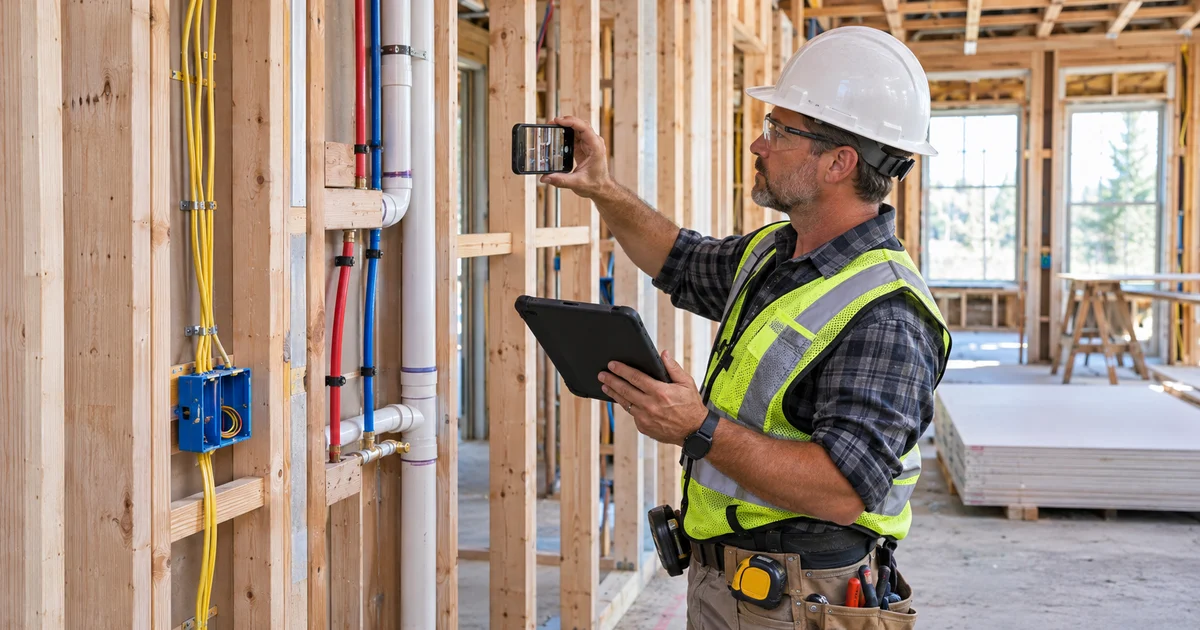
The drywall crew is unloading when the superintendent asks whether the shower valve blocking was checked, the exterior penetrations were sealed, and the electrician corrected the box in the hall. Someone remembers taking photos. The plumber says the issue was handled. The inspection card is in the trailer. The current plan is in an email. Covering the wall would keep the schedule moving—but reopening it later would turn a small uncertainty into demolition, blame, and another trip for three trades.
That is the real pain behind searches for construction quality control software, a construction quality control app, or construction defect tracking software. Contractors need a repeatable way to define what must be ready, capture what was actually observed, route questions and corrections, and let an appropriate person verify closure before the next operation hides the work.
THE SHORT ANSWER
Construction quality control software creates a traceable path from the current requirement to field evidence, correction, and independent verification.
BuildVecta connects project files and plans, daily logs, job photos, field issues and RFIs, inspection results and corrections, assigned punch items, closeout documents, acceptance details, and warranty history. A residential builder, remodeler, or trade contractor can use that connected record to make quality checkpoints visible and keep unresolved work from disappearing into texts. BuildVecta does not inspect or certify work, interpret code, perform testing, direct means and methods, or replace the contractor, superintendent, design professional, manufacturer, testing agency, or code official.
Quality control is not one final walk
A punch walk can find paint defects and a missing cover plate. It cannot reliably show whether a concealed penetration was sealed, flashing was layered correctly, underground work was placed at the required elevation, or the approved product was installed before it disappeared. Contractor quality control has to follow the work while it remains observable.
A practical residential process can be organized around four questions: What controls the work? Is the area ready? What was observed? Who verified the correction? The answers may come from the contract, current drawings, specifications, manufacturer instructions, approved selections or submittals, permit conditions, inspection requirements, and the contractor's own workmanship standards. BuildVecta gives those records a shared job context instead of treating quality as a folder created at closeout.
| Checkpoint | Question to answer | Useful evidence |
|---|---|---|
| Before work | Does the crew have the current requirement, approved product, location, and prerequisite work? | Current plan or file, selection, scope, assignment, schedule date |
| First installation | Does the initial work establish the accepted method and appearance? | Field observation, sample or mockup decision, photo, issue or RFI |
| Before concealment | Has visible work been checked, documented, and released for covering? | Context and detail photos, daily log, required inspection result |
| Correction | What failed, who owns the fix, when is it due, and what is affected? | Issue, location, assignee, due date, cost or schedule effect |
| Verification | Did an appropriate person review the corrected condition? | After photo, note, status, reinspection or professional record |
| Closeout | Are remaining items, final documents, acceptance, and warranty dates complete? | Punch list, inspection records, manuals, walkthrough, closeout archive |
Start with the current requirement, not an empty checklist
A generic checklist can remind a superintendent to look. It cannot decide what this project requires. The useful starting point is the work feature: for example, shower waterproofing, window flashing, framing before rough trades, electrical rough-in, cabinetry, exterior coating, or final equipment startup. For each feature, identify the controlling documents, responsible trade, prerequisites, required approvals or inspections, and the point after which the work becomes difficult to see or correct.
Keep the current plans, specifications, approved selections, relevant files, and field decisions in the job record. BuildVecta's construction document management workflow helps the contractor organize those files by project. When the field finds a conflict or missing detail, a construction RFI can preserve the question, location, trade, assignee, due date, answer, attachments, and cost or schedule effect.
Do not treat an informal answer as an approved design revision. Follow the contract's authority and notice rules. A field record should show which document or authorized response the crew used, not create authority that the contractor does not have.
Use hold points where the cost of being wrong changes sharply
A hold point is a deliberate pause before an irreversible or expensive next step. Residential contractors do not need enterprise terminology to use the idea. Before drywall, concrete placement, backfill, waterproofing cover, cabinetry templating, or equipment startup, name the person who confirms readiness and the evidence that must be present.
- Define the release: write the condition that must be true before the next operation begins.
- Name the reviewer: distinguish the installer, the contractor's checker, and any required third-party or official approval.
- List prerequisites: current documents, predecessor work, approved materials, access, testing, and required inspection status.
- Set the timing: place the checkpoint early enough to correct work without blocking an arriving crew.
- Record the result: preserve the date, location, observation, photos, open corrections, and next action.
- Do not confuse records: a contractor check, code inspection, special inspection, manufacturer startup, and design-professional observation are not interchangeable.
BuildVecta's schedule and task record can make the checkpoint visible, while daily logs, photos, issues, and inspection records preserve what happened. The software does not enforce a physical stop-work condition. That remains a project leadership and contract responsibility.
Document concealed work so the photo can be understood later
A close-up of pipe, wire, or membrane with no location is rarely enough. Use a repeatable photo set: one context image showing the room or elevation, one or more details showing the condition, and a location reference that another person can understand. Capture the work before it is covered, then store it with the right job and date.
BuildVecta keeps project photos and construction daily logs connected to the job. A daily log can record crews, work completed, deliveries, delays, safety notes, photos, and the next-day plan. The dedicated photo documentation guide explains how context, detail, timing, and a consistent naming practice make field images useful after the crew has moved on.
A photo proves only what it actually shows. It does not prove dimensions that cannot be read, performance that requires testing, work outside the frame, or compliance that requires professional judgment. Pair photos with inspection, test, submittal, or manufacturer records when the project requires them.
Turn every quality problem into an owned, verifiable item
“Tell the electrician to fix the hall box” is not a durable control. A useful issue identifies the exact location, observed condition, current requirement or open question, responsible trade or person, due date, related files, and whether cost or schedule may be affected. If the answer requires design authority, route it as an RFI rather than inventing a field solution.
BuildVecta's Issues & RFIs workspace can record an RFI, field issue, design decision, or submittal with an assignee, location, trade, due date, attachments, answer, status, and impact fields. That keeps the question and response with the job. It does not determine the technically correct answer; the appropriate authorized person does.
Describe the observed condition
Use a specific location and neutral facts. Attach a context view and the relevant detail.
Connect the requirement
Reference the current drawing, specification, approved selection, instruction, or inspection correction.
Assign the next action
Name the responsible person, due date, required response, and known schedule or cost effect.
Capture the response
Preserve the authorized answer, revised file, correction note, and supporting evidence in the job record.
Move to ready to verify
The installer reports completion; an appropriate reviewer checks the corrected condition.
Close with evidence
Record verification, required reinspection, and any downstream schedule, cost, or closeout update.
Keep required inspections separate—and connected
Contractor quality checks do not replace jurisdictional inspections. The project may also require special inspections, testing, professional observations, energy verification, manufacturer sign-off, or commissioning. The applicable code, permit, contract, design documents, and local authority determine those obligations.
BuildVecta's inspection tracking workflow can organize required inspections, planned and actual dates, results, corrections, reinspection status, and related permit or job records. That allows a superintendent to see whether the inspection is merely requested, actually passed, conditionally accepted, or still waiting on a correction before the next trade covers the work.
For context, the U.S. Department of Energy's Building America guidance includes pre-drywall and final quality-control checkpoints for high-performance homes, while the International Code Council's model-code materials describe records and correction of discrepancies for certain special inspections. Those are useful process examples, not a universal checklist. Contractors must use the requirements that apply to their own project and jurisdiction.
Separate “fixed” from “verified”
The person performing a correction can report that the work is ready. Closing it should require the review appropriate to the risk and contract. That may be the superintendent, project manager, design professional, inspector, testing agency, manufacturer representative, or another authorized party. A low-risk finish touch-up and a failed structural special inspection should not share the same closure rule.
BuildVecta's construction punch list uses open, in-progress, ready-to-verify, and complete statuses. The distinction is simple but important: “ready to verify” means the assigned person believes the work is corrected; “complete” means the contractor's required verification step has occurred. Required reinspection or professional acceptance still remains separate.
Build a quality record that survives closeout
The quality record should not end when the certificate of occupancy arrives or the homeowner moves in. Closeout is where the contractor confirms that punch work, required inspections, final documents, manuals, warranties, walkthrough notes, acceptance details, and remaining obligations are organized. BuildVecta's construction project closeout workflow connects those items to the permanent job archive.
Later service requests can reveal a recurring installation, product, or coordination problem. Keeping warranty service connected to the original project helps a contractor find the relevant selection, trade, photo, inspection, or closeout record and use that history to improve future checkpoints. That is useful feedback, not a promise that defects or disputes will disappear.
A practical quality-control workflow in BuildVecta
Organize the controlling record
Keep the accepted scope, current files, approved selections, trade assignments, and schedule with the job.
Name checkpoints before work starts
Identify prerequisites, concealment points, required inspections, reviewer, and evidence for each important work feature.
Record the field condition
Use daily logs and job photos with clear dates, locations, context, and details while work remains visible.
Route issues and RFIs
Assign the question or correction, preserve the authorized answer, and record schedule or cost effects.
Check correction and inspection status
Separate installer completion from contractor verification and any required official or professional acceptance.
Carry the record through closeout
Connect punch, final records, acceptance, warranty dates, and later service to the original job.
What to evaluate in construction quality management software
Search results often group very different products under construction quality management software. Before buying, test the workflow on one real project rather than choosing from a feature list. Use a work feature with a current drawing, a concealed condition, a field question, an assigned correction, a required inspection, and a closeout record.
- Can the team find the current project document without searching personal inboxes?
- Can photos be tied to the correct job, date, location, and issue?
- Can a field question preserve the response, attachments, owner, due date, and impact?
- Can inspection results, corrections, and reinspection status remain distinct?
- Can the fixer mark an item ready while another person verifies completion?
- Can office and field staff use the record at a practical phone or tablet width?
- Can client-facing updates remain separate from internal notes and cost controls?
- Can punch, final documents, acceptance, and warranty history remain with the job?
- Are the product's limits clear for offline work, formal quality plans, testing, BIM, agency scheduling, signatures, and exports?
BuildVecta is designed to connect the operating record for residential builders, remodelers, general contractors, and trades. It is not presented as a laboratory testing system, code-compliance engine, BIM coordination platform, formal enterprise inspection-and-test-plan system, or replacement for qualified field supervision.
Authoritative references for building a project-specific process
Quality requirements are project- and jurisdiction-specific. Useful primary references include the U.S. Department of Energy's quality-management guidance for existing homes and advanced construction documentation guidance, which illustrate staged checks and documentation in residential work. The 2024 International Building Code special-inspection chapter provides a model-code example of inspection records and discrepancy correction, subject to local adoption and amendments. Use the adopted code, permit conditions, contract documents, manufacturer instructions, and licensed professionals applicable to the project.
Frequently asked questions
What is construction quality control software?
Construction quality control software helps a contractor plan quality checkpoints, keep current documents available, record field observations and photos, route questions and corrections, track inspection results, and preserve verification through punch and closeout. It supports the process; it does not inspect work, certify compliance, or replace the contractor, design professional, testing agency, or code official.
What should a contractor quality control record include?
The record should identify the project, location, work feature, governing drawing or specification, responsible trade, readiness requirements, observation date, person recording it, photos or files, open issue, required correction, due date, inspection or test result when applicable, and who independently verified closure. Contract and jurisdiction requirements may call for additional records.
How does BuildVecta support construction quality control?
BuildVecta keeps plans and files, daily logs, project photos, field issues and RFIs, required inspection records, corrections, assigned punch items, closeout documents, acceptance details, and warranty history connected to one job. The contractor defines the checkpoints, reviews the evidence, controls sharing, and remains responsible for workmanship and compliance.
Can BuildVecta document work before it is concealed?
Yes. The contractor can store job photos and daily records before insulation, drywall, finishes, concrete placement, backfill, or other covering work. A useful photo set includes a context view, detail views, location information, and the date. Photos are evidence of a condition, not proof that every requirement was satisfied.
Can BuildVecta track construction defects and corrective work?
BuildVecta can record a field issue or RFI with a location, trade, assignee, due date, files, answer, status, and cost or schedule effect. Near closeout, punch items can move through open, in-progress, ready-to-verify, and complete statuses so the person fixing an item does not have to be the person verifying it.
Does quality control software replace building inspections?
No. Required building inspections, special inspections, testing, professional observations, commissioning, manufacturer requirements, and contractual acceptance remain separate obligations. BuildVecta organizes the contractor's record but cannot approve work or determine legal compliance.
What is the difference between quality control and a punch list?
Quality control starts before work begins and continues while each feature is installed and still visible. A punch list usually addresses incomplete or corrective work near the end. A strong process prevents avoidable punch items, but it also preserves punch, verification, and closeout records for remaining work.
How much does BuildVecta cost?
BuildVecta Core is $39 per month plus applicable tax after a three-day free trial. The trial includes one takeoff. Optional add-ons, marketing upgrades, advertising spend, payment processing, QuickBooks or other third-party fees, permit fees, and physical gifts are separate.
KEEP QUALITY EVIDENCE WITH THE JOB
Make the next “ready to cover” decision from a current, reviewable record.
Try BuildVecta with a live project: organize the current documents, capture a concealed condition, assign a field issue, track the inspection result, and carry the verified record into punch and closeout.
BuildVecta Core is $39 per month plus applicable tax after the three-day free trial. The trial includes one takeoff. Optional add-ons, marketing upgrades, advertising spend, payment processing, QuickBooks or other third-party fees, permit fees, and physical gifts are separate.
Start the three-day free trial